
Systems Engineering · Linux Internals
Understanding the Filesystem Hierarchy Standard (FHS) — why everything has a place, and why that place matters.
Technical Deep Dive◆~12 min read◆April 2026
Table of Contents
- Why Directory Structure Matters
- The Filesystem Hierarchy Standard
- The Root Directory ( / )
- Core System Directories Explained
- User-Space Directories
- Runtime & Virtual Filesystems
- Key Distinctions: Commonly Confused Paths
- Conclusion
When you first look at a Linux system, the directory layout can feel alien — a tangle of cryptic abbreviations like /usr, /sbin, and /proc that seem to follow no obvious logic. But there is logic — elegant, battle-tested logic — codified in the Filesystem Hierarchy Standard. Once you understand it, navigating any Linux system becomes intuitive, and diagnosing problems becomes dramatically faster.
01 Why Directory Structure Matters
Linux inherits its philosophy from Unix: everything is a file. Running processes, hardware devices, system configurations, kernel interfaces — they all manifest as files organized within a single, unified directory tree rooted at /. There are no separate drive letters, no hidden system partitions inaccessible to the user.
This design has profound consequences. It enables shell scripting to compose complex workflows from simple tools. It makes system administration predictable: a seasoned admin who has never touched your specific distribution can still find the configuration files, because the FHS tells them exactly where to look. And it makes security auditing tractable — file permissions govern access to everything.
Key Principle
The Linux directory tree is not a collection of separate volumes — it is one logical namespace. Physical disks and network shares are mounted at arbitrary points within this tree, hiding their physical boundaries behind a uniform interface.
02 The Filesystem Hierarchy Standard
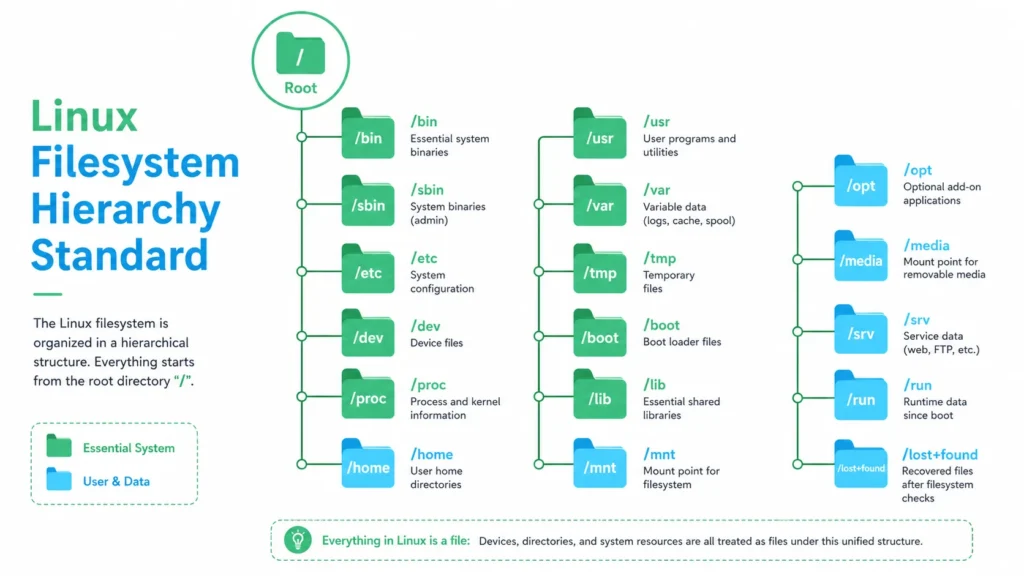
The Filesystem Hierarchy Standard (FHS), maintained by the Linux Foundation, defines the directory structure and directory contents in Linux and Unix-like operating systems. Most major distributions — Debian, Ubuntu, Fedora, Arch, and their derivatives — follow FHS, ensuring that software written for one distribution can reasonably expect to find system resources in the same locations on another.
The FHS distinguishes directories along two axes:
| Axis | Category A | Category B |
|---|---|---|
| Shareability | Shareable — can be shared across hosts (e.g., /usr) | Unshareable — host-specific (e.g., /etc, /boot) |
| Mutability | Static — does not change without admin action (binaries, libraries) | Variable — changes during normal operation (logs, spool files) |
This framework explains design decisions that might otherwise seem arbitrary: /var exists precisely to isolate variable data from otherwise static filesystems that can be mounted read-only.
03 The Root Directory ( / )
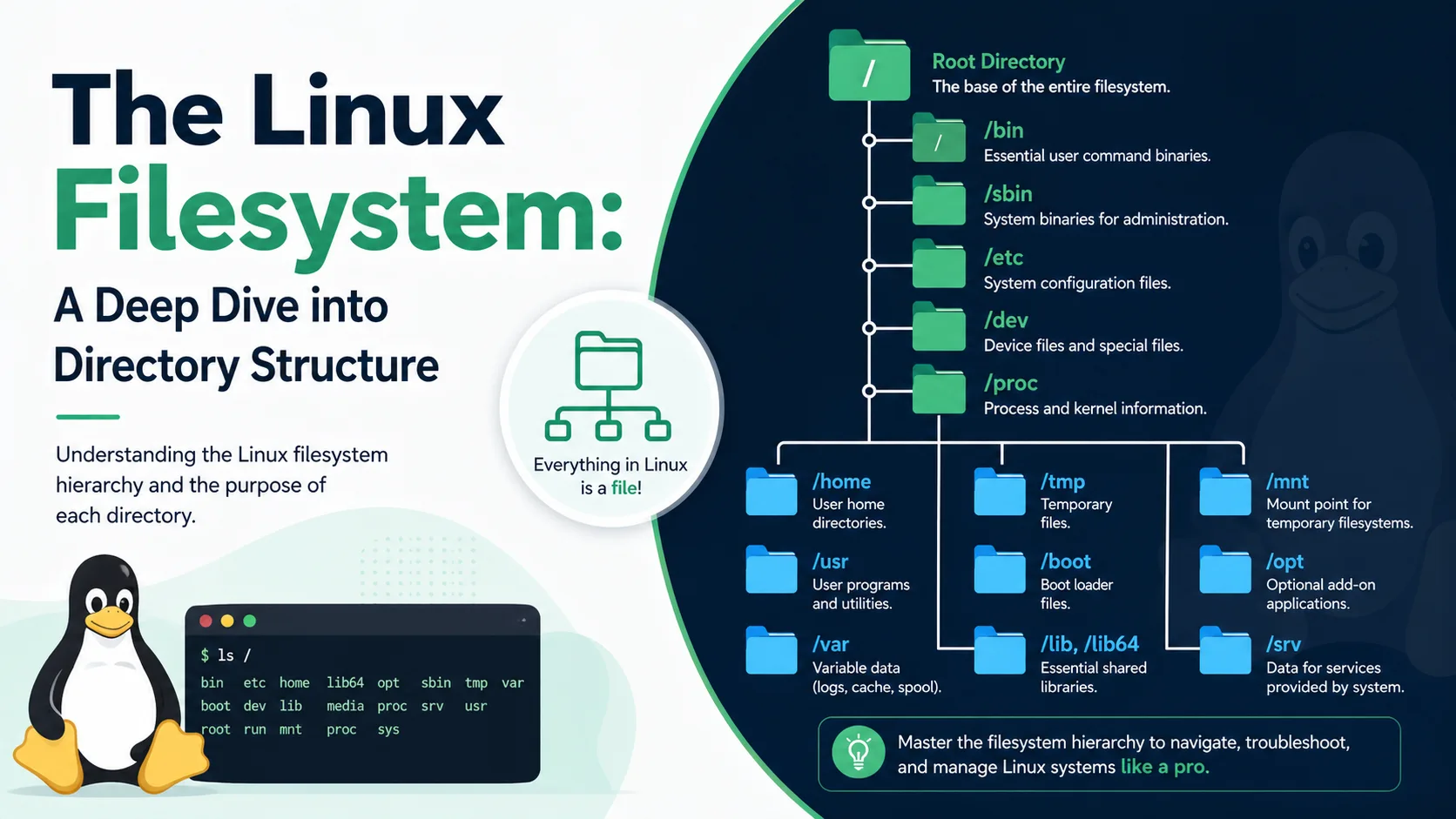
The root directory is the origin of the entire filesystem tree. Every absolute path begins here. On a freshly installed Linux system, a directory listing of / reveals the foundational structure:
/
├──bin# Essential user binaries
├──boot# Boot loader & kernel images
├──dev# Device files
├──etc# Host-specific configuration
├──home# User home directories
├──lib# Essential shared libraries
├──media# Removable media mount points
├──mnt# Temporary mount point
├──opt# Optional/third-party software
├──proc# Kernel & process virtual FS
├──root# Root user's home
├──run# Runtime volatile data
├──sbin# System administration binaries
├──srv# Service data
├──sys# Kernel device tree (sysfs)
├──tmp# Temporary files
├──usr# Secondary hierarchy
└──var# Variable data (logs, caches)
On modern systemd-based distributions, several of these are actually symlinks pointing into /usr — part of the “usrmerge” initiative — but the logical structure remains the same.
04 Core System Directories Explained
/bin
Essential command binaries needed in single-user mode and by all users: ls, cp, mv, cat, bash. Must be available even when /usr is not mounted.
/sbin
System administration binaries intended for root: fsck, ip, iptables, reboot. Separated from /bin to signal that regular users rarely need them directly.
/boot
Everything needed to boot the OS: kernel images (vmlinuz), initial RAM disk (initrd), and bootloader configuration (GRUB). Often a separate partition formatted with a simpler filesystem.
/etc
Host-specific system-wide configuration files. No binaries live here — only text configs. Critical files include /etc/passwd, /etc/fstab, /etc/hosts, and /etc/ssh/.
/lib
Shared libraries essential for binaries in /bin and /sbin. Also contains kernel modules under /lib/modules/. Equivalent to DLLs on Windows.
/dev
Device files managed by udev. Block devices (/dev/sda), character devices (/dev/tty), and pseudo-devices (/dev/null, /dev/random) all live here.
/opt
Self-contained, optional software packages — typically commercial or third-party applications that do not follow FHS themselves (e.g., Google Chrome, proprietary IDEs). Each app gets its own subdirectory.
/srv
Data served by the system. Web content in /srv/http/, FTP files in /srv/ftp/. Clearly separates served data from system files and user data.
A Closer Look at /etc
No directory is more important to a sysadmin than /etc. It is the nerve center of system configuration. Understanding its layout is essential for any meaningful administration:
shell# Key files inside /etc /etc/passwd # User account database (no passwords!) /etc/shadow # Encrypted password hashes (root-only) /etc/group # Group definitions /etc/fstab # Filesystem mount table /etc/hostname # Machine hostname /etc/hosts # Static DNS mappings /etc/resolv.conf # DNS resolver configuration /etc/crontab # System-wide scheduled tasks /etc/systemd/ # systemd unit overrides /etc/ssh/sshd_config # SSH daemon configuration
Pro Tip
Always version-control /etc using a tool like etckeeper. Every configuration change becomes a tracked commit, giving you a full audit trail and easy rollback capability.
05 User-Space Directories
The /usr Hierarchy
Despite its name suggesting “user,” /usr stands for Unix System Resources — a secondary hierarchy for read-only, shareable data. It is the largest directory on most systems and mirrors the structure of /:
/usr├──bin# Non-essential user binaries (gcc, git, vim…)├──sbin# Non-essential system admin binaries├──lib# Libraries for /usr/bin and /usr/sbin├──include# C/C++ header files├──share# Architecture-independent data (man pages, icons)├──local# Tertiary hierarchy for locally compiled software└──src# Source code (optional)
The /usr/local subtree is particularly important: it mirrors /usr again and is reserved for software compiled and installed manually by the administrator (via make install), ensuring it never conflicts with the package manager’s domain.
Home Directories: /home & /root
Each non-root user gets a personal directory under /home — typically /home/username. This is where personal files, shell configuration (.bashrc, .zshrc), and application settings (.config/, .local/) reside. The root user’s home is intentionally separated at /root, ensuring it is accessible even when /home is on a separate, unmounted partition.
Variable Data: /var
/var holds everything that changes continually during normal operation:
| Path | Contents | Notes |
|---|---|---|
| /var/log | System and application logs | Monitor with journalctl or directly |
| /var/cache | Application cache data | Safe to delete; will be regenerated |
| /var/spool | Print queues, mail spools | Data awaiting processing |
| /var/lib | Persistent application state | Databases, package manager state |
| /var/tmp | Temporary files preserved across reboots | Unlike /tmp, not cleared on boot |
| /var/www | Web server document root (convention) | Strictly speaking, this should be in /srv |
06 Runtime & Virtual Filesystems
Among the most fascinating — and least understood — parts of the Linux hierarchy are directories that do not correspond to actual files on disk. They are virtual filesystems that the kernel populates in memory at runtime.
/proc — The Process Information Filesystem
Mounted as procfs, this directory exposes the kernel’s internal data structures as a browsable filesystem. Every running process has a subdirectory named after its PID containing files that reveal memory maps, open file descriptors, environment variables, and more.
bash# Inspect process 1 (systemd/init)cat/proc/1/cmdline# Command that started itcat/proc/1/status# Memory, UID, statels/proc/1/fd/# Open file descriptors# System-wide kernel infocat/proc/cpuinfo# CPU detailscat/proc/meminfo# RAM usage breakdowncat/proc/mounts# Currently mounted filesystemscat/proc/sys/net/ipv4/ip_forward# Tunable kernel param
/sys — The Kernel Device Tree (sysfs)
Introduced to replace cluttered /proc entries, /sys (mounted as sysfs) exposes a structured view of the kernel’s device model. It is organized by bus type, driver, and device, making it the authoritative source for hardware introspection and runtime kernel parameter tuning.
bash# Read CPU frequency scaling governorcat/sys/devices/system/cpu/cpu0/cpufreq/scaling_governor# Change governor to performance mode (root required)echo”performance” | tee/sys/devices/system/cpu/cpu*/cpufreq/scaling_governor# Check if a network interface is upcat/sys/class/net/eth0/operstate
/dev — Device Files
Managed by the udev daemon, /dev is populated dynamically as hardware is detected. Two types of device files exist: block devices (disks, partitions — data accessed in fixed-size blocks) and character devices (terminals, serial ports — data streamed byte by byte). Pseudo-devices like /dev/null (discards all writes), /dev/zero (produces infinite zeros), and /dev/urandom (cryptographic randomness) are among the most commonly used in scripting.
/run — Ephemeral Runtime State
A tmpfs filesystem cleared at every boot, /run stores PID files, lock files, sockets, and other runtime artifacts that daemons need to communicate. It replaced the old convention of scattering such files across /var/run and /tmp.
07 Key Distinctions: Commonly Confused Paths
Even experienced Linux users sometimes conflate these directory pairs. Here are the most important distinctions to internalize:
| Path A | Path B | The Distinction |
|---|---|---|
| /bin | /usr/bin | /bin must be available before /usr is mounted (early boot). /usr/bin holds everything else. On modern systems, /bin is often a symlink to /usr/bin. |
| /tmp | /var/tmp | /tmp is cleared on every boot (or may use tmpfs in RAM). /var/tmp persists across reboots. Use /var/tmp for files that should survive a restart. |
| /proc | /sys | Both are virtual kernel interfaces. /proc is older, less structured, and exposes process and system info. /sys is newer, strictly organized around the device model. |
| /usr/local | /opt | /usr/local follows FHS conventions internally (bin, lib, share). /opt is for self-contained software that brings its own directory layout. |
| /media | /mnt | /media is for automounted removable media (USB drives, CDs). /mnt is a generic, manual mount point for temporary filesystem attachment. |
| /root | /home/root | The root user’s home is /root, not /home/root. This ensures root can always access their home directory regardless of /home‘s mount status. |
08 Conclusion
The Linux filesystem hierarchy is not bureaucratic overhead — it is a carefully reasoned architecture shaped by decades of real-world use. Every directory boundary reflects a design decision: separating variable data from static data enables read-only root filesystems. Isolating boot-critical binaries in /bin enables single-user recovery. Virtualizing hardware as files in /dev and /sys enables composable tooling.
Mastering this structure pays compound dividends. You will write more correct shell scripts, configure services more reliably, debug failures more quickly, and reason about security more clearly. When something goes wrong on any Linux system — even an unfamiliar one — the FHS gives you a map.
Next Steps
Explore the official FHS specification at refspecs.linuxfoundation.org, and practice with man hier on any Linux system for a compact reference to every standard directory. The more intentionally you navigate the filesystem, the more the design reveals itself.
A Deep Dive into Linux Systems Engineering · Filesystem Hierarchy Standard
PUBLISHED APRIL 2026 · SYSTEMS SERIES