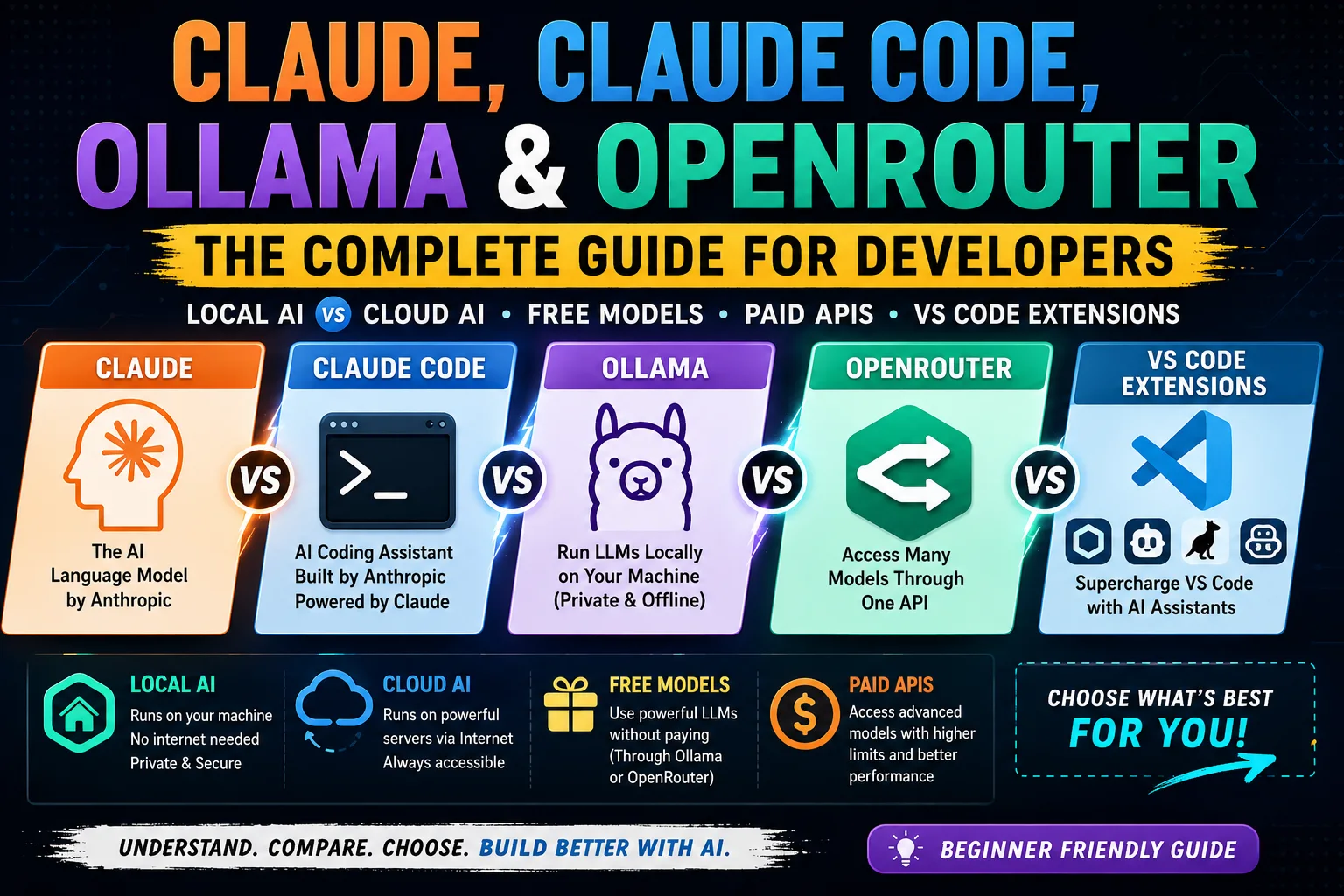

Confused about Claude, Claude Code, Ollama, OpenRouter, Local AI, Cloud AI, and VS Code AI extensions? You’re not alone. Many developers hear these terms every day but struggle to understand how they fit together. This guide breaks everything down in simple language so you can confidently choose the right AI setup for your development workflow.
Why Is Everyone Talking About AI Coding Assistants?
Artificial Intelligence has completely changed software development. Instead of writing every line of code manually, developers now use AI to:
- Generate HTML templates
- Write CSS and Tailwind code
- Build React and Next.js components
- Debug JavaScript
- Explain errors
- Refactor large codebases
- Generate documentation
- Write SQL queries
- Create APIs
The challenge is that there are now dozens of AI-related tools, each serving a different purpose. Let’s understand them one by one.
Understanding the AI Ecosystem
Think of AI development as a simple chain:
You
   ↓
VS Code / IDE
   ↓
AI Extension
   ↓
AI Provider
   ↓
Language Model
   ↓
Response
Each layer has a different responsibility.
What is Claude?
Claude is an Artificial Intelligence language model developed by Anthropic.
Just like:
| Company | AI Model |
|---|---|
| OpenAI | ChatGPT (GPT) |
| Anthropic | Claude |
| Gemini | |
| Meta | Llama |
| DeepSeek | DeepSeek |
| Alibaba | Qwen |
Claude is the brain.
It understands your prompts and generates responses.
Example:
Write a React Login FormClaude processes your request and returns working code.
Important: Claude runs on Anthropic’s cloud servers. Your computer simply sends requests to those servers.
What is Claude Code?
Many people think Claude Code is another AI model.
It isn’t.
Claude Code is a coding assistant application powered by Claude.
Think of it like this:
Claude
   │
   ▼
Claude Code
   │
   ├── Read project files
   ├── Search code
   ├── Edit files
   ├── Fix bugs
   ├── Execute terminal commands
   ├── Run tests
   └── Git integration
Claude Code is the worker.
Claude is the intelligence.
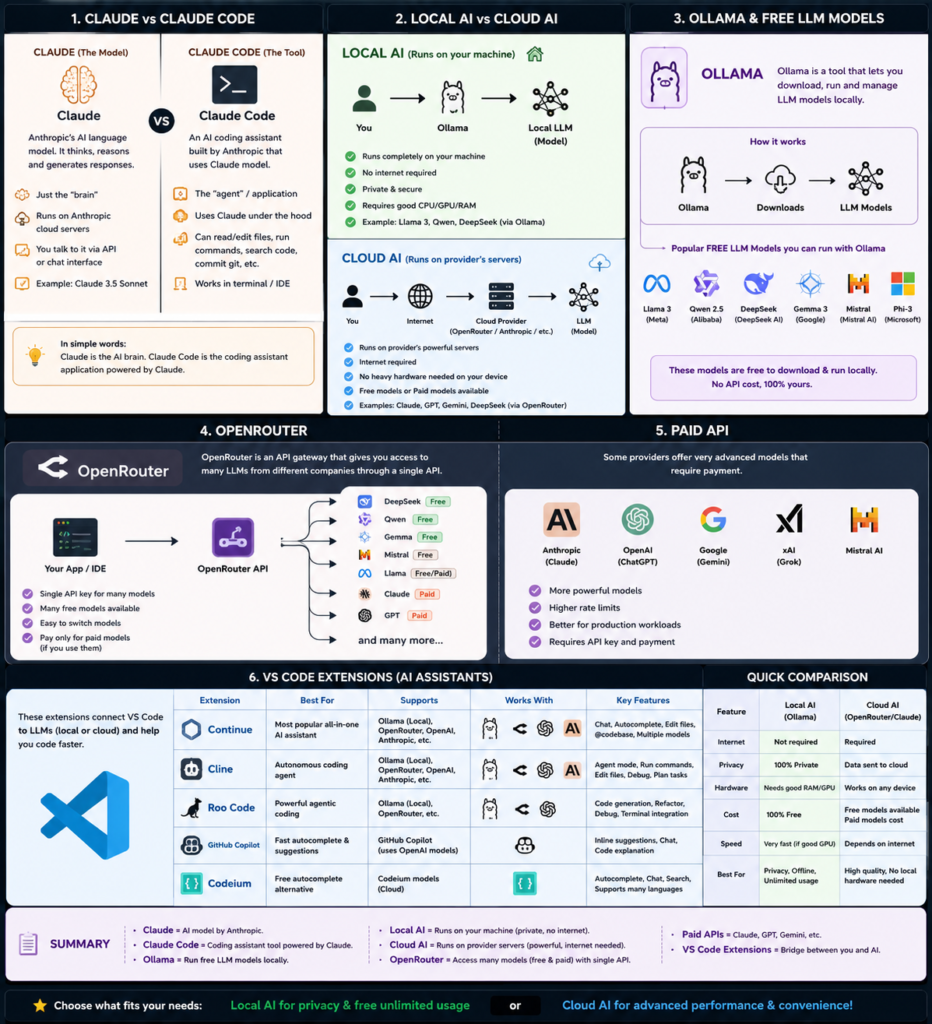
Claude vs Claude Code
| Claude | Claude Code |
|---|---|
| AI language model | AI coding assistant |
| Understands prompts | Uses Claude to complete coding tasks |
| Runs on Anthropic servers | Runs inside your terminal or IDE |
| Cannot edit your files directly | Can read and modify project files |
| The brain | The assistant |
A simple way to remember it:
Claude is the engine. Claude Code is the car.
What is Ollama?
Ollama is not an AI model.
Instead, Ollama is a local AI runtime.
Think of it like Docker.
Docker runs containers.
Ollama runs AI models.
Example:
ollama run qwen2.5-coderor
ollama run llama3Everything happens on your own computer.
No internet.
No subscriptions.
No cloud.
Ollama is Like a Media Player
Imagine VLC.
VLC isn’t a movie.
It simply plays movies.
Similarly:
Ollama
       ↓
Runs AI Models
The actual intelligence comes from the model you download.
Popular Free Models for Ollama
Ollama supports many powerful open-source models.
Some of the best include:
| Model | Best For |
|---|---|
| Qwen Coder | Web Development |
| DeepSeek Coder | Programming |
| Llama 3 | General AI |
| Gemma | Fast assistant |
| Mistral | Lightweight AI |
| Phi | Small local models |
These models can generate code, explain errors, and assist with development without requiring an internet connection.
What is Local AI?
Local AI means the model runs entirely on your own computer.
You
     ↓
VS Code
     ↓
Ollama
     ↓
Local AI Model
Advantages
- Works offline
- Unlimited prompts
- No API charges
- Private
- No data leaves your computer
Disadvantages
- Requires powerful hardware
- Large models consume RAM and GPU memory
What is Cloud AI?
Cloud AI means the model runs on someone else’s servers.
You
     ↓
Internet
     ↓
AI Provider
     ↓
Response
Examples include:
- Claude
- ChatGPT
- Gemini
- Grok
Advantages
- Very powerful
- No heavy hardware required
- Works on lightweight devices
Disadvantages
- Requires internet
- May have usage limits
- Some services require payment
Local AI vs Cloud AI
| Feature | Local AI | Cloud AI |
|---|---|---|
| Internet Required | ❌ No | ✅ Yes |
| Privacy | Excellent | Depends on provider |
| Speed | Very fast (good hardware) | Depends on internet |
| Monthly Cost | Usually free | Often subscription/API-based |
| Hardware Requirement | High | Low |
What is OpenRouter?
OpenRouter is one of the most useful tools for developers.
It acts as a single gateway to many AI models.
Instead of creating accounts for multiple providers, you use one API.
VS Code
      ↓
OpenRouter
      ↓
Choose Model
Through OpenRouter, you can access models from multiple companies using the same interface.
Depending on availability, you may find:
- Free models
- Paid models
- Experimental models
This makes it incredibly easy to switch between different AI providers.
What are Paid APIs?
Some AI companies charge based on usage.
These include:
- Anthropic (Claude)
- OpenAI (GPT)
- Google (Gemini)
- xAI (Grok)
When your application sends requests, you’re billed according to the provider’s pricing.
Paid APIs generally offer:
- Higher quality
- Better reasoning
- Faster responses
- Larger context windows
- Enterprise reliability
What Are VS Code AI Extensions?
VS Code itself does not contain AI.
Extensions connect your editor to AI providers.
Popular options include:
| Extension | Best For |
|---|---|
| Continue | Flexible local & cloud AI |
| Cline | AI coding agent |
| Roo Code | Autonomous coding |
| GitHub Copilot | Inline suggestions |
| Codeium | Free code completion |
These extensions become the bridge between your editor and the AI model.
Which Extension Should Beginners Choose?
If you’re starting today:
✅ Continue
It supports:
- Ollama
- OpenRouter
- OpenAI
- Anthropic
- Gemini
- Local models
- Cloud models
It provides one of the most flexible AI experiences available.
Recommended Setup for Different Developers
Budget-Friendly Setup
- VS Code
- Continue
- OpenRouter
- Free Models
Perfect for Raspberry Pi and lightweight laptops.
Privacy-Focused Setup
- VS Code
- Continue
- Ollama
- Qwen Coder
Runs completely offline.
Professional Development Setup
- VS Code
- Continue
- Ollama
- OpenRouter
- Claude (optional)
Use local AI for everyday tasks and cloud AI only when you need more advanced reasoning.
Example Workflow
Imagine you’re building a Next.js website.
You ask:
Create a responsive pricing page using Tailwind CSS.
The workflow looks like this:
VS Code

↓

Continue Extension

↓

OpenRouter

↓

Qwen Coder

↓

Generated Code
Or locally:
VS Code

↓

Continue

↓

Ollama

↓

DeepSeek Coder

↓

Generated Code
Both produce similar results, but one uses your hardware while the other relies on the cloud.
Which Setup Do I Recommend?
For most developers, a hybrid approach offers the best experience.
Local Machine (Desktop)
- Ollama
- Qwen Coder
- DeepSeek Coder
- Continue
Ideal for privacy, speed, and unlimited usage.
Raspberry Pi or Low-Power Devices
- Continue
- OpenRouter
- Free cloud models
No expensive GPU or large RAM required.
This combination lets you enjoy modern AI coding assistance without investing in high-end hardware.
Final Thoughts
Artificial Intelligence is quickly becoming an essential part of software development, but understanding the ecosystem is the key to using it effectively.
Remember these simple definitions:
- Claude is an AI language model.
- Claude Code is a coding assistant powered by Claude.
- Ollama runs AI models locally on your machine.
- OpenRouter provides access to many AI models through a single API.
- Local AI prioritizes privacy and offline usage.
- Cloud AI delivers powerful models without requiring expensive hardware.
- VS Code AI extensions connect your editor to the AI service you choose.
Whether you’re coding on a powerful desktop or a Raspberry Pi, there’s an AI workflow that fits your hardware, budget, and privacy needs. By understanding how these tools work together, you can build a development environment that’s both efficient and future-ready.